

A forwarder automatically sends a copy of incoming email to another address. For example, you can have sales@yourdomain.com arrive in your personal inbox, without creating a separate mailbox.
Forward one address
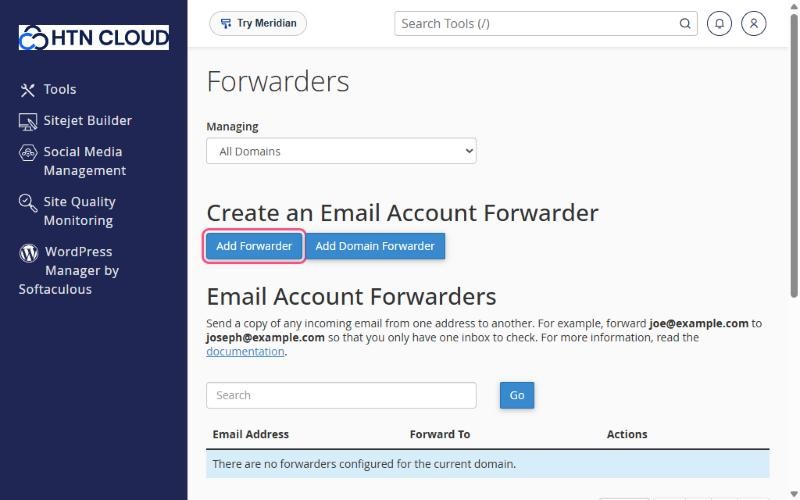
- In cPanel, open Email → Forwarders.
- Click Add Forwarder.
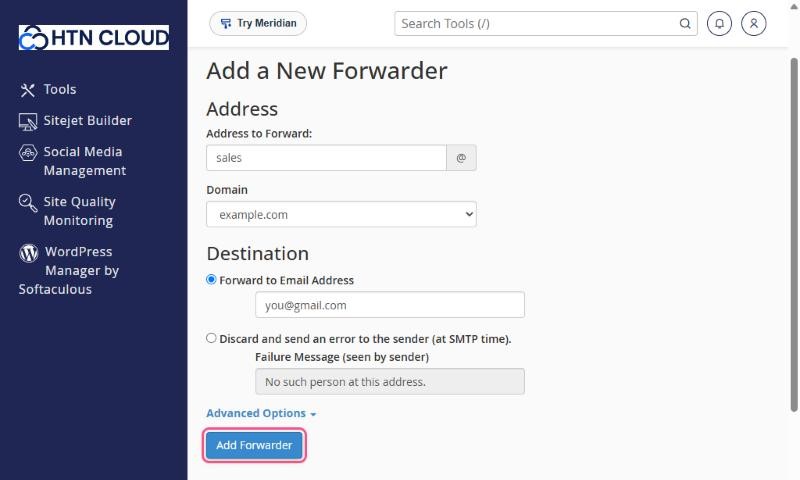
- Address to Forward: type the part before the @ (for example
sales) and choose the domain. - Under Destination, choose Forward to Email Address and type the address that should receive the copies.
- Click Add Forwarder.
Good to know
- A forwarder can exist without a mailbox. Email is then only forwarded, not stored.
- If a mailbox with the same address exists, the email is kept in the mailbox and forwarded.
- You can create several forwarders for the same address to send copies to more than one person.
Forwarding to Gmail, Outlook.com or Yahoo: if spam arrives at your address, it gets forwarded too and those providers may start to distrust the forwarded mail. Keep your spam filter on (see How to manage spam filters). For important mail, consider adding the mailbox to your app with IMAP instead of forwarding.
Forward a whole domain
Add Domain Forwarder sends all email for one domain to the same address on another domain. For example, anything@olddomain.com goes to anything@newdomain.com. It's useful when you've changed your company name.
Remove a forwarder
On the Forwarders page, find it under Email Account Forwarders and click Delete.
