

To show your website and receive email, your domain needs to "point" to your HTN Cloud account. You do this by adding a few DNS records at the company where your domain's DNS is managed. This is usually where you bought the domain, but it could also be a DNS service you use.
Step 1: Find your account's IP address
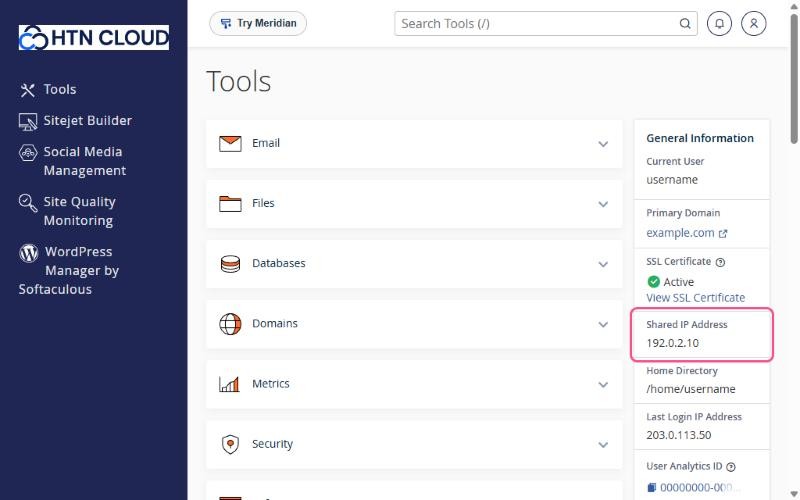
Your IP address is in your welcome email. You can also find it in cPanel, in the General Information panel on the right, under Shared IP Address.
Step 2: Add the records at your domain provider
Log in to your domain provider and open the DNS settings for your domain. It might be called DNS Management, DNS Zone or Advanced DNS. Then add or edit these records, replacing 192.0.2.10 with your own IP address:
| Type | Name / Host | Value / Points to | What it does |
|---|---|---|---|
| A | @ | 192.0.2.10 | Your website (yourdomain.com) |
| CNAME | www | yourdomain.com | Makes www.yourdomain.com work too |
| A | mail | 192.0.2.10 | Your mail server address |
| MX | @ | mail.yourdomain.com (priority 0 or 10) | Delivers your email to HTN Cloud |
| TXT | @ | Your SPF record (see below) | Helps your emails avoid spam folders |
- Remove any old A records for
@andwwwthat point somewhere else. Otherwise visitors may still see your old site. - If you use email with another provider, such as Google Workspace or Microsoft 365, don't change your MX records. Only add the A and CNAME records for the website.
- If your DNS provider has a proxy feature (for example Cloudflare's orange cloud), set the
mailrecord to DNS only. Email can't pass through a web proxy.
Step 3: Add your email authentication records
For the best email delivery, copy the recommended SPF, DKIM and DMARC records from cPanel to your DNS provider. See How to set up SPF, DKIM and DMARC for your domain.
Step 4: Wait a little
DNS changes usually start working within an hour, but can take up to 24 to 48 hours to reach everyone. When your domain points to us, a free SSL certificate is issued automatically. See Free SSL certificates: how AutoSSL works.
Optional records
These are not required, but they make some addresses easier to remember:
| Type | Name / Host | Value | Lets you use |
|---|---|---|---|
| A | ftp | 192.0.2.10 | ftp.yourdomain.com for FTP |
| A | webmail | 192.0.2.10 | webmail.yourdomain.com |
| A | cpanel | 192.0.2.10 | cpanel.yourdomain.com |
See also Which DNS records to add at your domain provider for the full reference.
