

Permissions control who can read, change or run each file and folder. The right permissions keep your site working and secure. The wrong ones can cause errors like "403 Forbidden" or "500 Internal Server Error".
The short version
| Item | Recommended |
|---|---|
| Folders | 755 |
| Files (HTML, PHP, images, CSS…) | 644 |
Sensitive config files (e.g. wp-config.php) | 600 or 640 |
Never use 777. It lets anyone change the file. It's a security risk and the server may refuse to run PHP files with this permission.
What the numbers mean
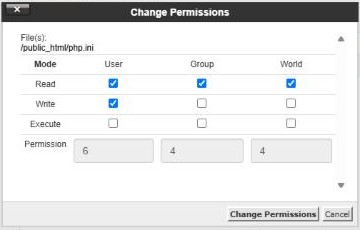
Each number has three digits, one each for the User (you), the Group and the World (everyone else). Each digit adds up: Read = 4, Write = 2, Execute = 1.
6= read + write5= read + execute4= read only
So 644 means you can read and write and everyone else can only read.
Change permissions in File Manager
- In File Manager, select the file or folder.
- Click Permissions in the toolbar.
- Tick the boxes or type the number, then click Change Permissions.
In FileZilla, right-click a file and choose File permissions…. See How to connect with FileZilla.
Seeing an error?
- 403 Forbidden: check that the folder is
755and the files are644and that there's anindex.htmlorindex.phpfile. - 500 Internal Server Error after uploading: check permissions on the PHP files and whether you recently changed
.htaccess.
