

Websites built with PHP, like WordPress, run best on a current PHP version. Newer versions are faster and get security updates. You can choose the PHP version yourself, for your whole account or per domain.
Change the PHP version for your account
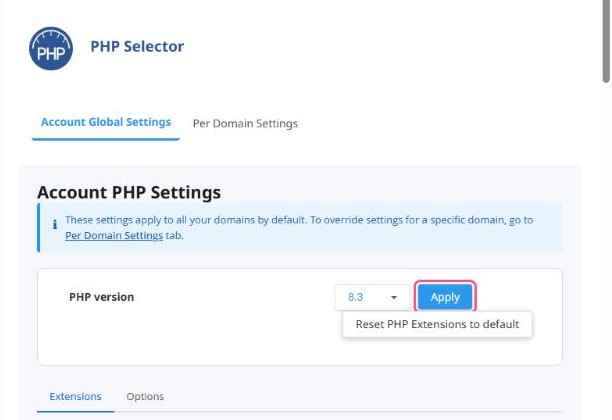
- In cPanel, open Software → Select PHP Version.
- On the Account Global Settings tab, click the version next to PHP version and choose the one you want, for example 8.3.
- Click Apply. The change takes effect straight away.
Different versions per domain
Use the Per Domain Settings tab to give a specific domain its own version. This is useful when an older site needs an older PHP while your main site uses the newest.
Which version should I choose?
- For WordPress and most modern apps: 8.2 or 8.3.
- Check your theme's and plugins' requirements if you're not sure.
- Avoid versions below 8.0 unless a very old application needs them. They no longer get security updates.
After changing: open your website and check a few pages. If something breaks, switch back to the previous version and click Apply. Then update your themes and plugins before trying again.
PHP extensions
On the same page, the Extensions tab lets you turn PHP modules on or off, such as imagick, intl or ioncube_loader. Only change these if an app asks for a specific extension. Reset PHP Extensions to default undoes your changes.
Need to change upload size or memory? See How to change PHP settings (upload size, memory limit).
