

By default, only websites on your hosting account can connect to your MySQL databases. If you need to connect from somewhere else, for example a desktop tool like MySQL Workbench on your computer, allow that computer's IP address first.
Allow an IP address
- Find your public IP address. Search "what is my IP" in your browser.
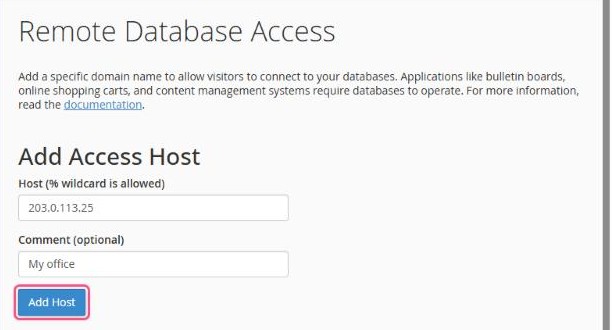
- In cPanel, open Databases → Remote Database Access.
- Under Host, enter your IP address and optionally a comment such as "My office".
- Click Add Host.
Connect
| Host | yourdomain.com (or your account's IP address) |
|---|---|
| Port | 3306 |
| User / Password | your database user, e.g. username_shopuser and its password |
| Database | e.g. username_shop |
Security tip: only add the specific IP addresses you need and remove them when you're done. Avoid the
% wildcard, which allows connections from anywhere.Doesn't connect?
- Your IP address may have changed. Many home connections get a new IP now and then. Check it again and update the entry.
- If your domain uses a proxy (for example Cloudflare), connect using the IP address instead of the domain name.
- Some office and public networks block port 3306.
