

Every domain on your HTN Cloud account gets a free SSL certificate. SSL makes your site load over https://, shows the padlock in the browser and protects your visitors' data. AutoSSL issues and renews certificates automatically, so there's nothing to buy or install.
How it works
- You point your domain to HTN Cloud. See How to point your domain to HTN Cloud.
- AutoSSL runs regularly on the server. It checks that each domain on your account points to us, then issues a certificate.
- Before the certificate expires, AutoSSL renews it automatically.
It usually takes from a few minutes to a few hours after your DNS has updated.
Check your SSL status
In cPanel, open Security → SSL/TLS Certificates (the Status tab). It lists every address on your account, such as yourdomain.com, www.yourdomain.com, mail.yourdomain.com and your subdomains, with its certificate status.
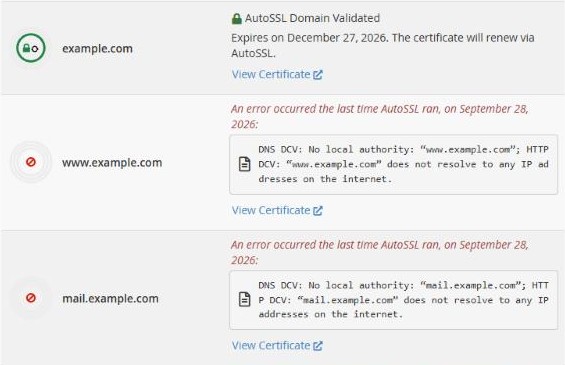
- AutoSSL Domain Validated (green padlock): all good.
- An error occurred… with "does not resolve to any IP addresses": this address has no DNS record yet, or it points elsewhere.
Fixing "does not resolve" errors
AutoSSL can only secure addresses that point to your HTN Cloud account. For each address with an error:
- www.yourdomain.com: add a CNAME
www→yourdomain.com. - mail.yourdomain.com: add an A record
mail→ your IP address, if you use email with us. - A subdomain: add an A record for it.
- Addresses you don't use, such as
cpanel.orwebdisk., can safely show an error. They don't affect your website.
See Which DNS records to add at your domain provider. After you fix the DNS, the next AutoSSL run picks it up automatically.
Next step
When your certificate is active, make sure all visitors use the secure version of your site. See How to force HTTPS on your website.
