

Directory Privacy lets you password-protect a folder on your website. Anyone who opens it has to enter a username and password first. It's useful for a private area, a test site or files you only want to share with a few people.
Protect a folder
- In cPanel, open Files → Directory Privacy.
- Click a folder name to open it and find the folder you want to protect, for example a folder inside
public_html. - Click Edit next to it.
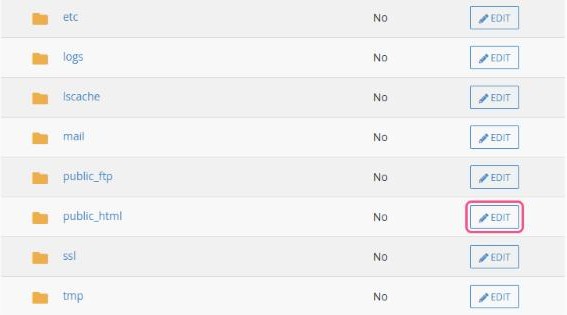
- Tick Password protect this directory, enter a name for the protected area (shown in the login box) and click Save.
- Under Create User, enter a username and a strong password, then click Save.
Open the folder's address in a private browser window. You should now see a login box.
Good to know
- These usernames are separate from your cPanel and email logins. Create one for each person who needs access.
- Protecting
public_htmlitself locks your whole website. That's handy while you build it, but remember to remove the protection when you go live. - To remove the protection, click Edit again, untick Password protect this directory and save.
WordPress tip: to protect your WordPress login page, use a security plugin rather than Directory Privacy on
wp-admin, which can break parts of your site.