

If a particular IP address is spamming your contact form, trying to break into your site or scraping your content, you can block it from your website.
Find the IP address
You can often find the address in your website's logs or in a security plugin. In cPanel, Metrics → Visitors shows recent visits with their IP addresses.
Block it
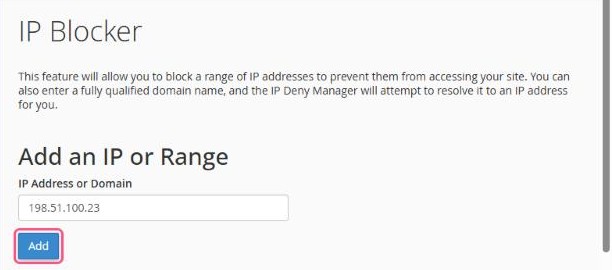
- In cPanel, open Security → IP Blocker.
- Under IP Address or Domain, enter the address or range.
- Click Add.
Formats you can use
| One address | 198.51.100.23 |
|---|---|
| A range | 198.51.100.1-198.51.100.40 |
| CIDR block | 198.51.100.0/24 |
Unblock
Scroll down to Currently-Blocked IP Addresses and click Delete next to the entry.
Good to know: IP Blocker blocks access to your website. It doesn't block email. Attackers often change IP addresses, so for ongoing attacks on a WordPress site, a security plugin with login protection works better.
Be careful not to block your own IP address. If your website suddenly stops loading for you but works on mobile data, check this list.
